New Navigation Overview
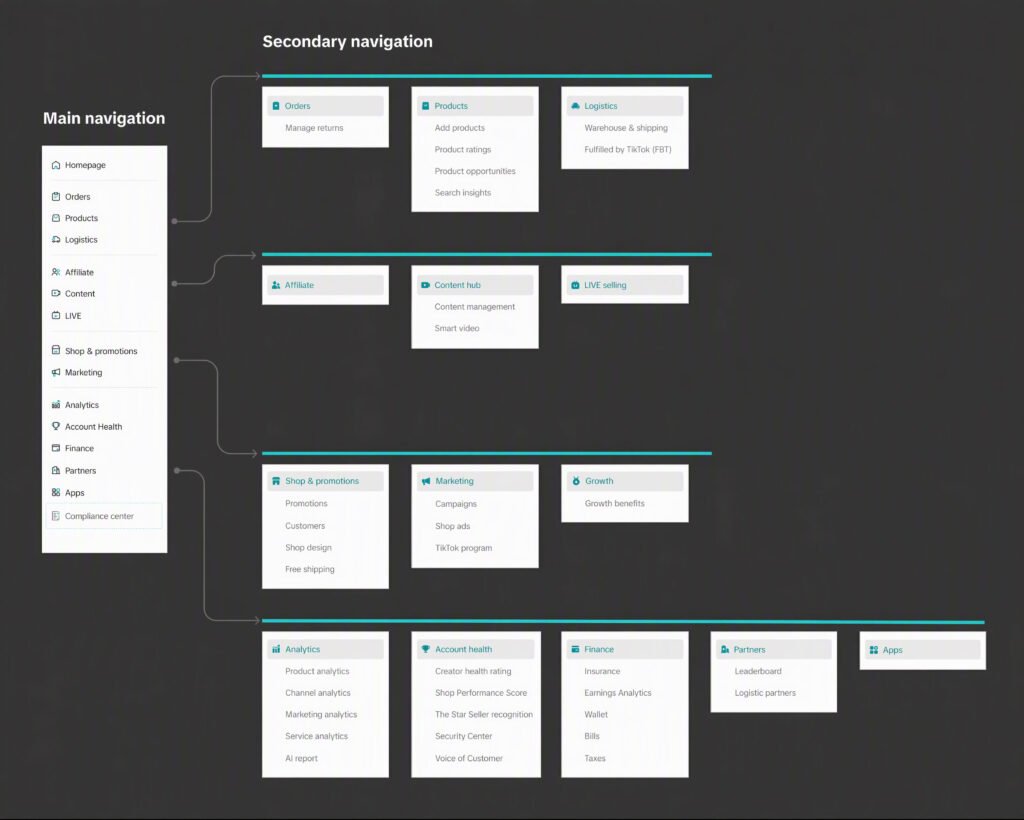
The overall navigation structure remains familiar, while feature grouping has been updated to better match business workflows.Menus are grouped by common business workflows, with related features organized under the same primary menu.
Three Key Upgrades
Shop&promotions and Marketing: easier to find what you need
Everyday shop management features, including shop design, customer tools, and promotions, are grouped under the new top-level Shop&promotions menu. A leaner Marketing keeps paid tools, including ads, campaigns, and other programs, easy to find.
| After | Before |
| Shop&promotionsPromotionsShop designCustomersFree shipping | MarketingPromotionsShop designCustomersOrdersFree shipping |
| MarketingCampaignShop adsSmart Promotion ProductsSearch insights | MarketingShop adsSearch insightsPromotionsShop designCampaignSmart PromotionNOVA campaigns |
Streamlined logistics
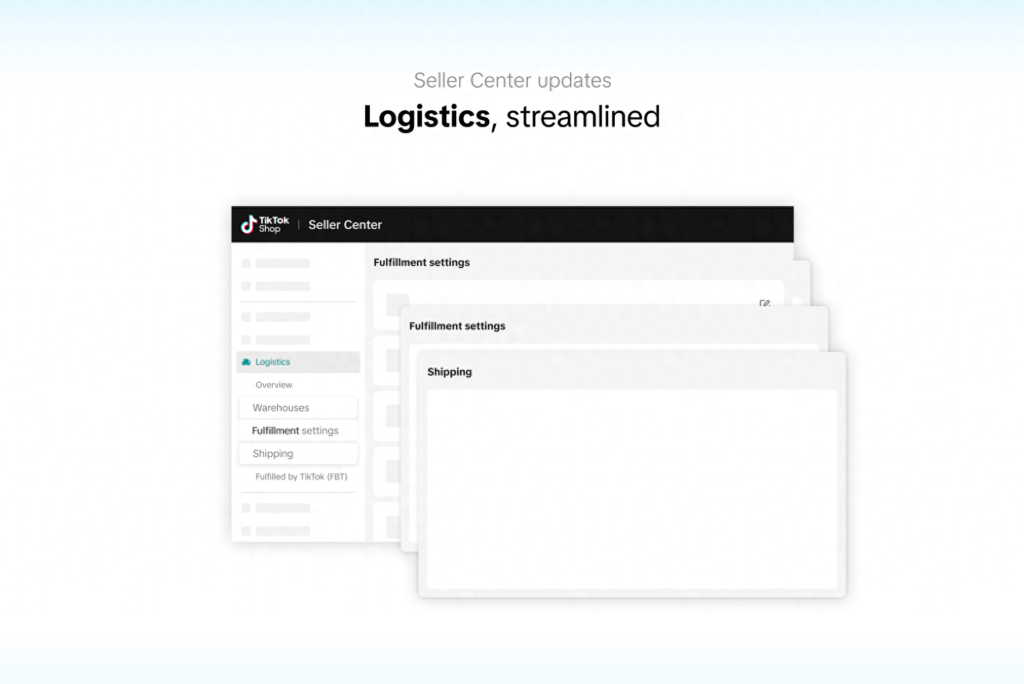
Warehouse settings, Fulfillment, and Shipping are now combined under Fulfillment settings in Logistics.
| After | Before |
| Logistics (landing page: Logistics overview)Warehouse & shipping, including warehouses, fulfillment, and shippingFulfilled by TikTok (FBT) | LogisticsOverviewWarehousesFulfillmentShippingFulfilled by TikTok (FBT) |
Top-level menu landing pages
Click the top‑level menu, and the landing page provides a holistic overview of key information for this module.
| After | Before | |||
| Primary menu | Landing‑page content | Primary menu | Landing‑page content | |
| Orders | Manage orders | Orders | N/A | |
| Products | Manage products | Products | N/A | |
| Logistics | Logistics overview | Logistics | N/A | |
| Affiliate | Affiliate overview | Affiliate | Affiliate overview | |
| Content hub | Content hub overview | Content hub | N/A | |
| LIVE selling | LIVE selling | LIVE selling | N/A | |
| Growth | Growth opportunities | Growth | N/A | |
| Shop&promotions | New landing page | – | – | |
| Marketing | New landing page | Marketing | N/A | |
| Analytics | Shop analytics | Analytics | N/A | |
| Account health | Account health rating | Account health | N/A | |
| Finance | Finance overview | Finance | N/A | |
| Partners | Find partners | Apps & partners | N/A | |
| Apps | App store | |||
Usage Recommendations
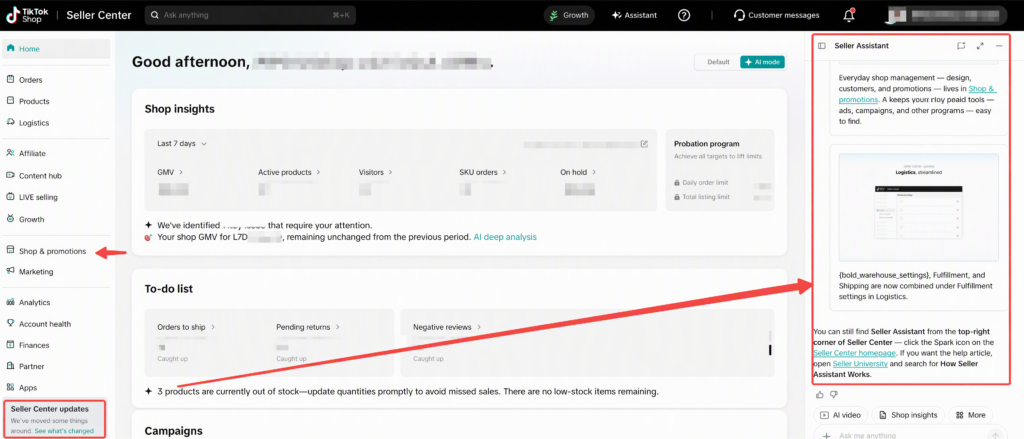
When you first access the updated navigation, you may see an on-screen navigation guide upon your initial login to the new-look Seller Center; simply follow the prompts to get familiar with the changes quickly. Alternatively, you can click “Navigation Update” in the bottom-left corner of the homepage to access the guide.
Where to find things
| If you want to… | Go to… |
| Work with creators, manage samples, view creator assets, or track affiliate transactions | Affiliate |
| Create or manage videos, photos, and other shop content | Content hub |
| Set up or manage LIVE shopping activity | LIVE selling |
| Update your shop design or manage customer-related tools | Shop&promotions |
| Create smart promotions, manage ads, join campaigns, or use TikTok programs | Marketing |
| Review shop performance and business insights | Analytics |
| Manage payments, settlements, and financial records | Finance |
| Check policy performance and account standing | Account health |
| View, process, and manage customer orders | Orders |
| Add, edit, and manage products | Products |
| Manage shipping, delivery, and logistics settings | Logistics |
Frequently Asked Questions
- Will my previous features disappear after the upgrade?
No. This update changes the navigation structure and locations of feature entries; it is not intended to affect your current feature access or account permissions. Features previously located under Customers, Apps & partners, and Marketing will appear in updated locations, subject to account eligibility and rollout status.
- Will my existing bookmarks still work?
If you have bookmarked specific pages in Seller Center, some saved links may continue to work after the navigation update. If a saved link no longer opens the expected page or you see a notice that the entry has changed, use the updated left-hand navigation to locate the relevant feature, then save the new page as a bookmark.
- Why haven’t I seen any changes on my page?
The new‑look navigation will be rolled out in phases, with the first release available for eligible US-local sellers. Accounts may gain access to the updated navigation at different times. Please refer to what is displayed on your Seller Center page.
- Where can I find Customers?
Features previously available under Customers, including Customer outreach and Segment, can now be found under Shop&promotions.
- Why am I directed to an overview page after clicking a top‑level menu?
Clicking a new top‑level menu will take you to its module landing page, which displays your business overview and frequently used features. The left‑hand sub‑menu will expand at the same time, allowing you to access specific features directly.
- How can I get support if I need help?
If you encounter permission errors, broken pages, or cannot locate frequently used features, please submit feedback via the Seller Center Help Center. Include your account details, screenshots of the issue and the original feature name, so that our team can troubleshoot quickly.
Attachment: Before & After Menu Overview
| After | Before | |||
| Menus | Source | Menus | Source | |
| Home | Unchanged | Home | Unchanged | |
| Orders | Upgraded from Orders > Manage orders | Quick Access | Removed | |
| Manage returns | Unchanged | Orders | Unchanged | |
| Fulfillment Performance | Unchanged | Manage orders | Upgraded to the Orders landing page | |
| Products | Upgraded from Products > Manage products | Manage returns | Unchanged | |
| Add products | Unchanged | Return settings | Merged into Orders > Manage returns | |
| Product Ratings | Unchanged | Fulfillment Performance | Unchanged | |
| Product opportunities | Unchanged | Free shipping | Moved to Shop&promotions > Free shipping | |
| Search insights | Moved from Marketing > Search insights | Products | Unchanged | |
| Logistics | Upgraded from Logistics > Overview | Manage products | Upgraded to the Products landing page | |
| Warehouse & shipping | Merged from Logistics > Warehouses, Shipping, and Fulfillment | Add products | Unchanged | |
| Fulfilled by TikTok (FBT) | Unchanged | Product Ratings | Unchanged | |
| Affiliate | Unchanged | Product opportunities | Unchanged | |
| Content hub | Upgraded from Content hub > Overview | Logistics | Unchanged | |
| Management | Unchanged | Overview | Upgraded to the Logistics landing page | |
| Smart video | Unchanged | Warehouses | Merged into Logistics > Warehouse & shipping | |
| Smart photo | New (rolling out in phases) | Fulfillment | Merged into Logistics > Warehouse & shipping | |
| LIVE selling | Upgraded from LIVE selling > LIVE selling | Shipping | Merged into Logistics > Warehouse & shipping | |
| Growth | Upgraded from Growth > Growth opportunities | Fulfilled by TikTok (FBT) | Unchanged | |
| Growth benefits | Unchanged | Marketing | Unchanged | |
| Shop&promotions | New | Shop ads | Unchanged | |
| Promotions | Moved from Marketing > Promotions | Search insights | Moved to Products > Search insights | |
| Shop design | Moved from Marketing > Shop design | Promotions | Moved to Shop&promotions > Promotions | |
| Customers | Consolidated from Customers | Shop design | Moved to Shop&promotions > Shop design | |
| Free shipping | Moved from Orders > Free shipping | Campaign | Unchanged | |
| Marketing | Carried over from Marketing | Smart Promotion | Unchanged | |
| Campaign | Unchanged | NOVA campaigns | Removed | |
| Shop ads | Unchanged | Customers | Consolidated into Shop > Customers | |
| Smart Promotion | Unchanged | Overview | Consolidated into Shop&promotions > Customers | |
| Analytics | Upgraded from Analytics > Shop analytics | Outreach | Consolidated into Shop&promotions > Customers | |
| Product analytics | Unchanged | Segment | Consolidated into Shop&promotions > Customers | |
| Channel analytics | Unchanged | Affiliate | Unchanged | |
| Marketing analytics | Unchanged | Content hub | Unchanged | |
| Service analytics | Unchanged | Overview | Upgraded to the Content hub landing page | |
| AI report | New | Management | Unchanged | |
| Account health | Upgraded from Account health > Account health rating | Smart video | Unchanged | |
| Creator health rating | Unchanged | LIVE selling | Unchanged | |
| Shop Performance Score | Unchanged | LIVE selling | Upgraded to the LIVE selling landing page | |
| The Star Seller recognition | Unchanged | Growth | Unchanged | |
| Security Center | New | Growth opportunities | Upgraded to the Growth landing page | |
| Voice of Customer | Unchanged | Growth benefits | Unchanged | |
| Finance | Upgraded from Finance > Overview | Apps & partners | Split into Partners and Apps | |
| Insurance | Unchanged | App store | Upgraded to the Apps landing page | |
| Earnings Analytics | Unchanged | Find partners | Upgraded to the Partners landing page and renamed to Find partners | |
| Wallet | New | Leaderboard | Moved to Partners > Leaderboard | |
| Bills | Unchanged | Logistics partners | Moved to Partners > Logistics partners and renamed | |
| Taxes | Unchanged | Analytics | Unchanged | |
| Partners | Upgraded from Apps & partners > Find partners and renamed | Shop analytics | Upgraded to the Analytics landing page | |
| Leaderboard | Moved from Apps & partners > Leaderboard | Product analytics | Unchanged | |
| Logistics partners | Moved from Apps & partners > Logistics partners and renamed | Channel analytics | Unchanged | |
| Apps | Upgraded from Apps & partners > App store | Marketing analytics | Unchanged | |
| Service analytics | Unchanged | |||
| Account health | Unchanged | |||
| Account health rating | Upgraded to the Account health landing page | |||
| Creator health rating | Unchanged | |||
| Shop Performance Score | Unchanged | |||
| The Star Seller recognition | Unchanged | |||
| Voice of Customer | Unchanged | |||
| Finance | Unchanged | |||
| Overview | Upgraded to the Finance landing page | |||
| Insurance | Unchanged | |||
| Earnings Analytics | Unchanged | |||
| Bills | Unchanged | |||
| Taxes | Unchanged | |||
Applicable product: TikTok Shop Seller Center Web. The final menu names, display scope and rollout schedule are subject to the actual product page and official announcements.